

Filter by any custom field

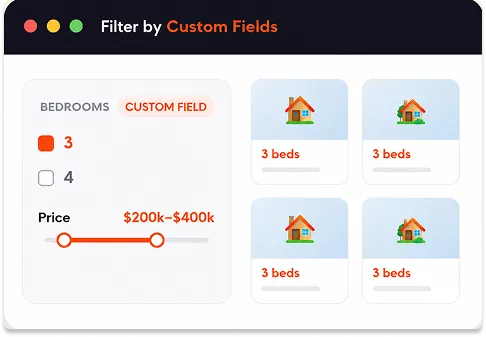


Filter custom fields four ways
Pick the module that fits your data — each one works with any custom field.

Checkbox
Let visitors tick one or more values of a custom field — perfect for fields with a set list of options, like brand, material, or number of bedrooms.

Dropdown
Show a custom field’s values in a compact dropdown — great when there are many options or when you want to save space in the filter.

Search
Add a search box tied to a specific custom field, so visitors can type to find matches within that field — like searching an SKU, model, or ISBN.

Range Slider
For number-based custom fields — price, mileage, square feet, weight — give visitors a slider to filter by a minimum and maximum value.
Built for any kind of site
If it’s stored as a custom field, visitors can filter by it.
Find the right home
Filter listings by the details that matter — stored as custom fields on each property.
Shop by specs
Let buyers narrow by the numbers and options that define each vehicle.
Filter by product data
Use WooCommerce product fields to filter by anything beyond the standard attributes.
How Custom Field Filtering works
Point a module at your field — that’s it.

Add a filter module
Choose a checkbox, dropdown, search, or range slider module in the builder.

Point it at your custom field
Select the custom field you want to filter by — any field on your posts or products.

Visitors filter by it
Your custom field data becomes a live filter, with results updating instantly via AJAX.
Filter by the data that matters to your site
Starts from
$39
Frequently Asked Questions
Q. Which modules can filter by custom fields?
Four modules: Checkbox, Dropdown, Search (for a specific custom field) and Range Slider. Choose whichever suits the type of data in your field.
Q. What kinds of custom fields does it support?
It works with your custom fields across posts, custom post types and WooCommerce products, so the data you’ve already attached to your content becomes filterable.
Q. Can I filter number fields by a range?
Yes. For number-based fields like price, mileage or square feet, use the Range Slider so visitors can filter between a minimum and maximum value.
Q. Does it work with WooCommerce products?
Yes. Product custom fields can be filtered just like fields on posts and custom post types.
Q. Is this included in the free version?
Custom Fields in Filters is a Category AJAX Filter Pro feature.